Individual Field Mapping
Prerequisites for Self Service Privacy Management
Before starting the Self-Service of Privacy Management –
- Install the Cloud Compliance Application from the AppExchange
- Configure the Grouping Rules of Individuals. Refer Grouping Rules for Individual.
- Consent Management features of Cloud Compliance with reference to the Consent Management.
- There should be at least one community created.
Note: For community creation details please click on the following link. Setup & Manage Community
- The Site Base URL must be overridden with a Community URL.
- At Least one Privacy Site record must be created for default purposes.
Self Service Configuration :
Click on the ‘Configure’ button on the Installed Packages page. Go to Self Service Tab.
There are three different sections in the Self Service Configuration tab –
- Consent Setting
- Individual Email Field Mapping
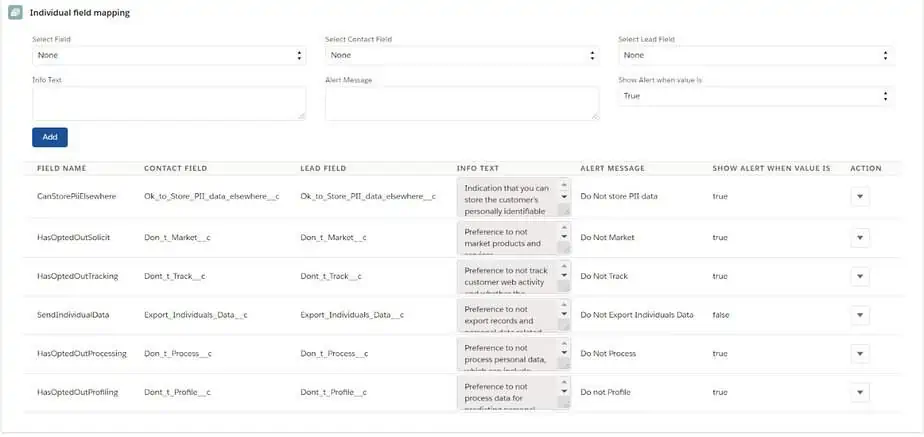
- Individual Field Mapping.
Select Individual FieldEmail Field Mapping
Users need to add the Individual fields in this section so that it will be available on the consent grid as ‘System Preference’ consents on Contact and Lead records.
1. Select Field – These are the system references like Don’t Market, Don’t Profile, Don’t Track, Don’t Process, Ok to store PII data elsewhere, etc.
2. Select Contact Field -This is used in Marketing Integration
3. Select Lead Field – This is used in Marketing Integration
4. Info Text – Help text for System Preferences will be available on the Self-Service Consent Grid.
5. Alert Message will be displayed upon the selection of ‘Show Alert when Value’ as True/False.
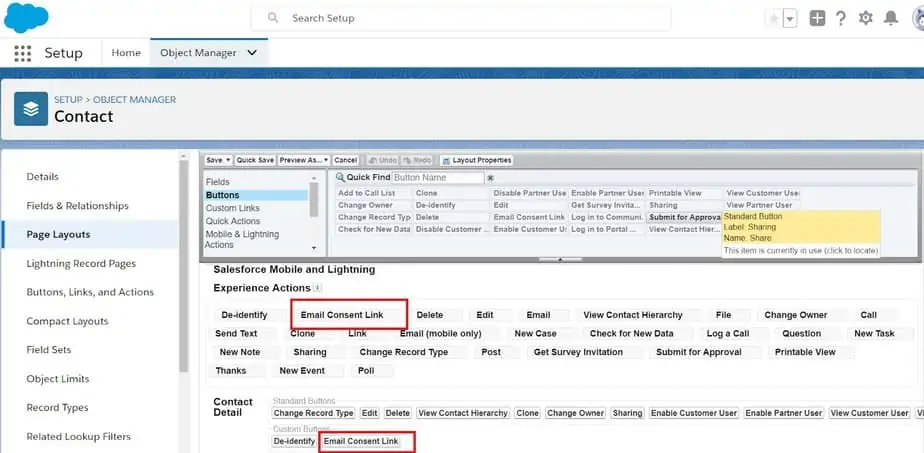
Addition of Email Consent Link button on a standard object – Contact/Lead
Cloud compliance provides Email Consent Link Button for standard objects Contact, Lead. This button is used for the Self-service feature in Consent Management
- Go to the Object Manager and select Contact/Lead.
- Select the appropriate page layout.
- Drag and drop the Email Consent Link button for classic as well as lightning.
- Click on the Save button.
Add the ‘Privacy Site URL’ field on Contact and Lead Object
To add the Privacy Site URL on the record page layout, go to Setup -> Object Manager -> Contact/Lead Page Layout.
When a user clicks on this Privacy Site URL, an email is sent to the user for managing their own privacy preferences.
Note: If the user wants to integrate Cloud Compliance’s consent-related fields such as Consent End dates, Privacy Site URL, or Individual system preferences in the user’s desired email software like Marketing Cloud/Pardot/Mailchimp/Eloqua/Marketo, etc then refer to our Marketing Integration guide.