
 Salesforce, Salesforce Data, salesforce security, Salesforce Data benefits, Salesforce Data Management, Salesforce data retention
- September 2, 2022
Reducing Salesforce data footprint directly reduces the cost and risks of potential data leaks and embarrassment, as well as benefits your organization.
Here are 5 easy steps to automate data retention & masking for your Salesforce Org.
"Organizations that fully realize the value of reducing
obsolete data, still struggle with how to do it."
 classified ministry of defence documents found at bus stop
In this article, we will discuss the 5 steps to reducing obsolete data.
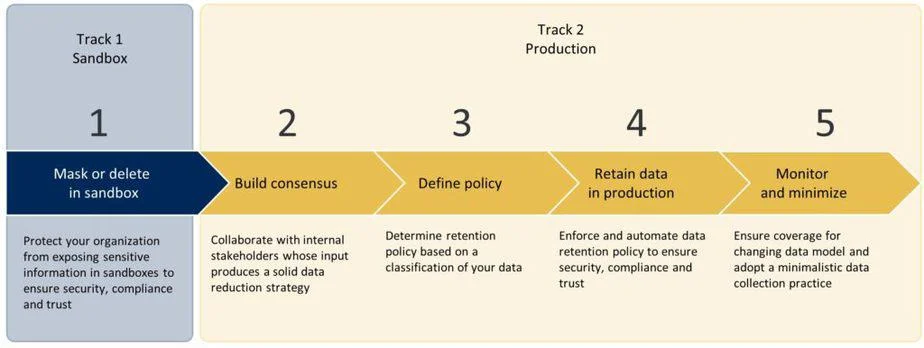 Diagram outlining a five-step data management strategy across development and production environments
Step 1 : Mask data in the sandbox
Protect your organization from exposing sensitive information in sandboxes to ensure security, compliance, and trust.
Sample Masking Policy:
Ensure that customer data is not accessible in the sandbox. Remove unnecessary business-sensitive data from sandboxes and delete/update any other data.
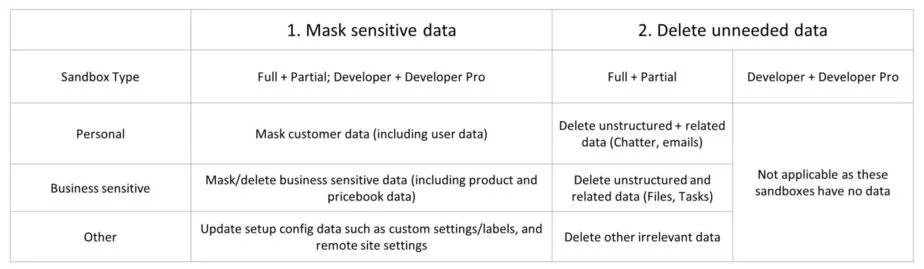 Table with strategies for handling sensitive data in different sandbox environments.
Data Masker – AppExchange | Free | 5 Star rated!
Step 2: Build Consensus
Collaborate with internal stakeholders whose input produces a solid data reduction strategy
-
Run Salesforce data coverage tools like Cloud Compliance’s Personal Data Discovery or FieldTrip to get a snapshot of the ‘state of data’ in your Salesforce Org.
-
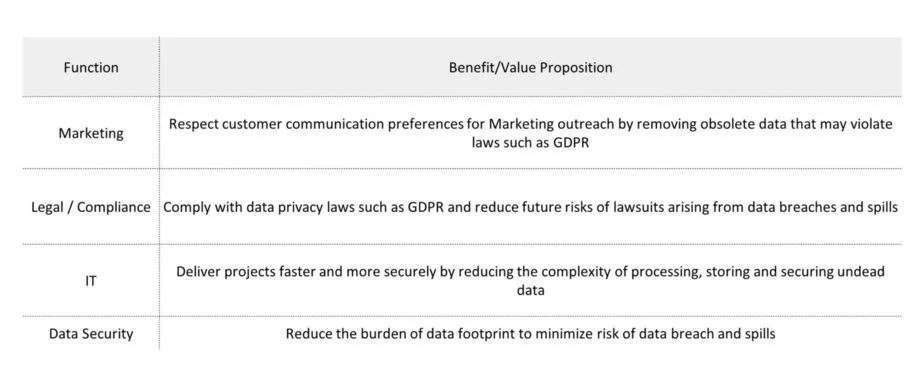
Share your findings and highlight the benefit of data reduction to your stakeholders
Step 3: Define Policy
Determine a retention policy based on a classification of your data
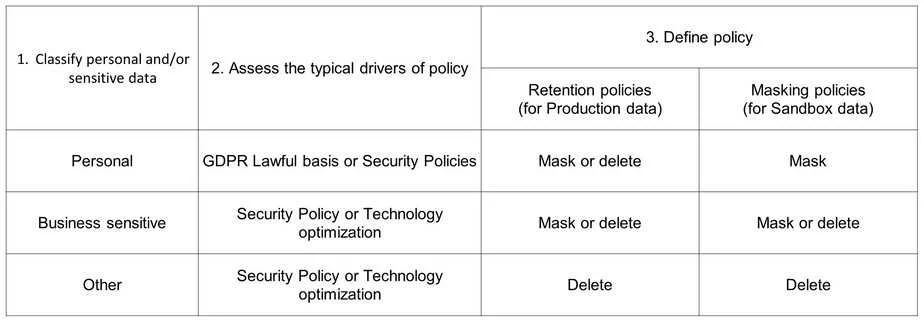 Table outlining a three-step process for data policy classification and management.
Step 4: Retain in production
Enforce and automate data retention policy to ensure security, compliance, and trust.
Typical Retention Policy
Identify leads with no movement for 9 months. Remove (mask) their personal data after a year and delete the masked leads after another 6 months.
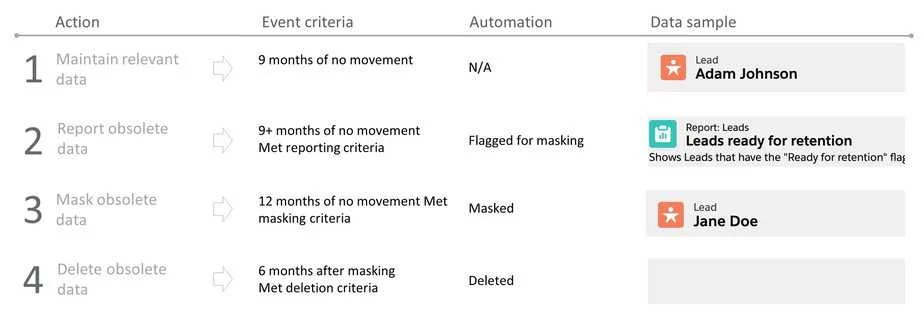 Table detailing a four-step data management process with event criteria and automation examples.
Data Masker – AppExchange | Free Trial | 5 Star rated!
Step 5: Monitor and Minimize
Ensure coverage for changing data model and adopt a minimalistic data collection practice:
- Monitor policy enforcement and execution
- Ensure coverage for changing data model
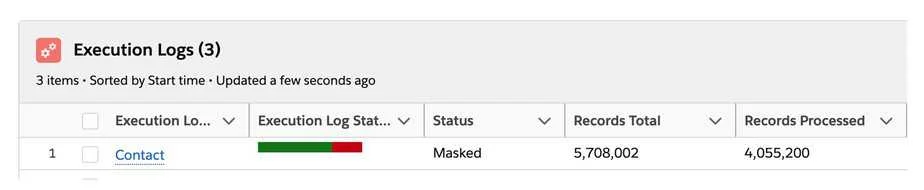 Screenshot showing a log entry for a data masking process, including total and processed records.
Related Articles

Saurabh Gupta
Saurabh is an Enterprise Architect and seasoned entrepreneur spearheading a Salesforce security and AI startup with inventive contributions recognized by a patent.
Related Articles

Salesforce Data Reduction – Step 1- Mask data in Sandbox
Salesforce sandbox full of extra data? Learn a quick salesforce data reduction trick to mask sensitive data in your sandbox & make it compliant

Salesforce Data Reduction : Step 3
Salesforce Data Reduction is about Why should you mask data in Salesforce and what kind of data should you be masking to ensure security.

Data Masking vs Data Seeding for Salesforce Sandboxes
Data masking vs data seeding for Salesforce sandboxes: Learn how each approach protects sensitive data, their key differences, and which fits your needs.