Create Masking Configuration
To add objects and fields for the masking process, you’ll need to create at least one Configuration.
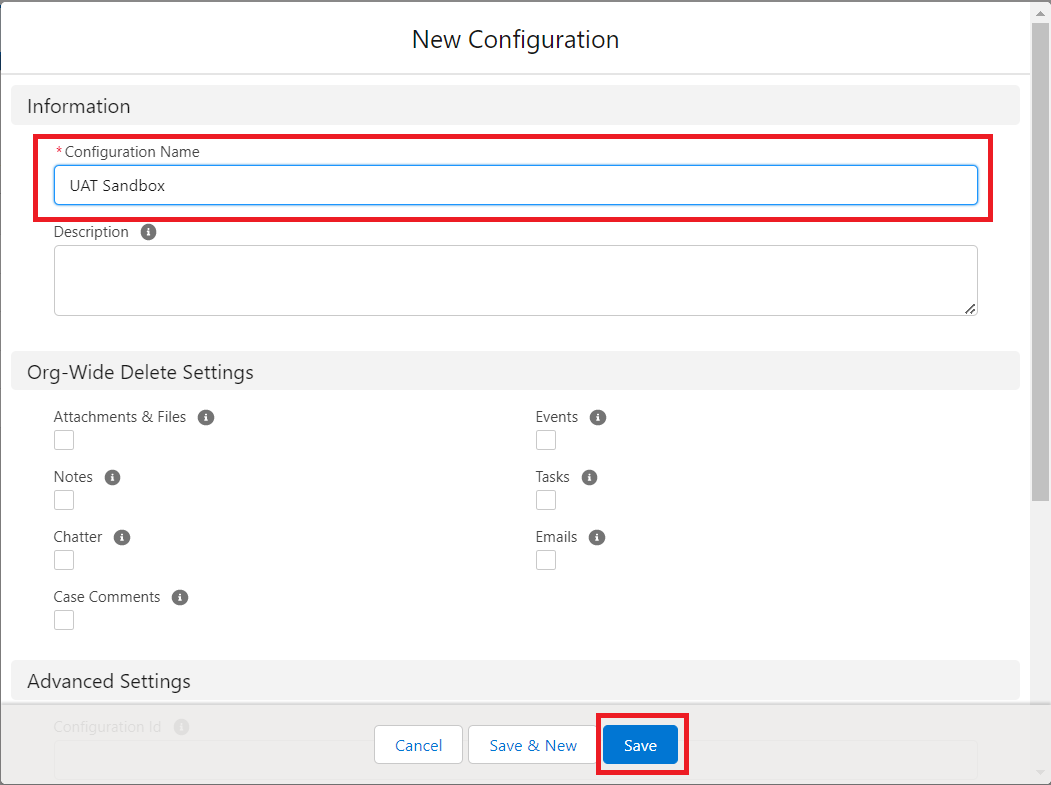
Step 1: Navigate to the ‘Configuration’ tab
Click on ‘New’.

Step 2: Enter a configuration name
We also recommend entering a description, but this is optional.
You will also see the ‘Retry Count’ field on this screen. It is used to repeat the execution of DataMasker if an error has occurred while processing. It is a numeric field with an initial value of 0.
If all the records are processed successfully and the status displays as “Completed” in the first execution, no additional executions will be performed. Retry Execution also gets updated in the current execution, no new execution will be created.
Step 3: Check all of the boxes in the ‘Delete Settings’ section
[If you select any activity in ‘Delete Settings’, the records of that activity will be deleted after the data masking execution completes.]
After setting up all Delete Settings, click on ‘Save’.
Advanced Configuration
The ‘Advanced Configuration’ section offers two distinct features: ‘Notify Users’ and ‘Activate Users’.

1. Notify Users
The ‘Notify Users’ feature allows users to get notifications after the successful execution of a masking batch. Simply add the username of any user who should be notified.
To add multiple usernames, separate each username with a comma.
- After batch execution is complete, notifications will appear at the bell icon.


2. Activate User
When you create, refresh, or clone a sandbox, user email addresses are modified in your sandbox so that production users don’t receive automatically generated email messages from the sandbox.
In your modified sandbox, user email addresses will now be appended with “.invalid”.
If you want to activate these users, you need to input the user’s Email ID here. As a result, the “.invalid” is removed.

3. Retry Count
Whenever any execution log errors out or the execution contains error records then those records will be retried again. The Retry Count will be specified in this field.
It should be more than 0. The retry frequency will be defined based on the count mentioned in this field.
For e.g., If the Retry Count is 1, and the main execution contains an error record, or any of the execution logs shows the status as Errored, then it will be retried once.
