

Data Masking vs Data Seeding in Salesforce: Which Approach Actually Protects Your Sensitive Data?

Table of Contents

TL;DR

Data masking and data seeding are two different approaches to removing sensitive data from Salesforce sandbox environments. Data masking (used by DataMasker) transforms real data in-place within Salesforce, like removing caffeine from coffee to make it decaf.

Data seeding generates artificial data through external systems – like manufacturing coffee-flavored liquid in a separate facility.

DataMasker runs inside Salesforce, making it 3x faster than alternatives and ready to implement in 3 weeks. Data seeding tools operate externally, pulling data out, analyzing it, and pushing artificial data back in. The key difference: masking updates existing real data to make it fake, while seeding generates completely artificial data from scratch.

What

 A comprehensive comparison of data masking versus data seeding for Salesforce sandbox environments, helping you choose the right approach to protect sensitive customer data during development and testing.

Who

Salesforce administrators, IT directors, CRM managers, developers, architects, and anyone responsible for data security in Salesforce environments.

Why

To ensure your sandbox environments are secure for development and testing while maintaining realistic data structures that don’t expose real customer information to contractors, testers, and developers.

→ Keep your customer data safe while enabling effective development workflows.

What can you do with it?

  • Secure Development Environments: Transform production data into realistic but safe test data that developers can work with confidently, without exposing sensitive customer information.

  • Contractor-Safe Testing: Enable external teams, freelancers, and contractors to access functional sandbox environments without risk of data breaches or compliance violations.

  • Rapid Deployment: Get your secure sandbox environments up and running in weeks rather than months, with minimal disruption to development workflows.

  • Cost-Effective Compliance: Meet data protection requirements without the overhead of complex external systems or expensive third-party data processing services.

Understanding the Problem: Production Data in Sandbox

Salesforce is customer relationship management software used by airlines, insurance companies, loan companies, and other large enterprises. When you call these companies, there’s a good chance they’re running on Salesforce.

These companies have two types of Salesforce instances:

  • Production Instance: Where real data lives. This is the operational system where business happens – real customers, real transactions, real money.

  • Sandbox Environment: A copy of production meant for trying new things out. This is where developers, trainers, and testers work. You can experiment freely without affecting the real business.


The challenge: Production data often ends up in sandbox environments. If you’re a bank, all your customers’ real information is in a sandbox where developers, testers, trainers, and contractors are working. You don’t want real data accessible to everyone who’s just testing.

The Coffee Shop Analogy: Understanding the Fundamental Difference

Think of your Salesforce production as a coffee shop with real espresso. Your sandbox is the training area.

Data Masking:
Like taking real espresso and removing the caffeine to make it decaf. You already have the coffee in the cup – you’re just taking out the caffeine. The coffee stays in your shop the entire time.

In Salesforce terms, DataMasker updates the real data already in your sandbox. Changes “Saurabh” to “Sam.” The data still looks realistic, but it’s no longer real.

Data Seeding:
Like having a separate facility analyze your coffee, then manufacture artificial coffee-flavored liquid to send to your training area. The real coffee never goes to the training area.

In Salesforce terms: An external application pulls real data from production, analyzes it, creates artificial data based on patterns, and pushes that fake data into an empty sandbox. If you have 50,000 contacts with insurance policies, it creates 50,000 fake contacts and policies.

Key Difference:

Masking = updating real data that’s already there
Seeding = generating and inserting artificial data

How Data Masking Works

Data masking operates directly within Salesforce, transforming real data without moving it outside your security perimeter.

The Process:

  • Real data exists in your sandbox (copied from production)
  • Masking tool runs entirely within Salesforce
    It updates and overwrites real values with realistic fake data
  • Example: “Saurabh, 555-123-4567” becomes “Sam, 555-987-6543”

What This Means:

  • Sensitive data never leaves Salesforce
  • No external cloud services involved
  • Everything stays within your security perimeter
  • The tool operates inside Salesforce, not outside

Key Characteristics:

  • Masking real data to make it realistic while taking out all sensitive and personal information
  • Updates happen in-place on existing data
  • Maintains data structure and relationships
  • No third-party external system taking data out

How Data Seeding Works

Data seeding takes a completely different approach using external systems.

The Process:

  • External application (third-party tool) pulls real data from Salesforce production
  • This application runs on external cloud infrastructure (Amazon Cloud, Azure Cloud, Google Cloud)
  • It analyzes the data to understand patterns and structures
  • Creates completely artificial data based on those patterns
  • Pushes the fake data into an empty Salesforce sandbox

What This Means:

  • Real data temporarily leaves Salesforce for analysis
  • Third-party cloud service processes your information
  • Generated data is completely artificial, never existed in production
  • Starts with an empty sandbox and fills it with generated data

Key Characteristics:

  • Not inside Salesforce – it’s a third-party tool
    Generates and inserts artificial data rather than updating real data
  • Real data from production never directly goes to the sandbox
  • There’s an in-between application handling the process

The Architecture Showdown: Inside vs Outside

Data Masking Architecture

Production Salesforce → Direct Transformation → Masked Sandbox
     (Real Data)      →    (Inside Salesforce)    →   (Fake Data)

What Happens:

  • Tool runs inside Salesforce
  • Takes existing real data in sandbox
  • Updates it with fake values
  • Everything stays within Salesforce

Data Seeding Architecture

Production Salesforce → External Analysis → Pattern Generation → Sandbox Population
     (Real Data)      →  (Third-party Cloud) →  (Artificial Data) →  (Fake Data)

What Happens:

  • External tool pulls data from production
    Analyzes it in a separate cloud (Amazon, Azure, Google)
  • Creates completely artificial data
  • Pushes fake data into an empty sandbox

Key Comparison Areas

Aspect Data Masking Data Seeding

Security & Architecture

Operates inside Salesforce, so sensitive data doesn’t leave your environment. No external data movement required.

Requires external processing, which means data leaves Salesforce temporarily for analysis by third-party systems.

Business & Production Support

Better for supporting testing and training since everything remains within Salesforce.

Requires managing external service integration and dependencies.

Development Support

Developers work with data structures that exactly match production, just with fake values.

Developers work with artificially generated data that mimics production patterns.

Data Approach

Updates real data in-place to make it fake

Generates completely artificial data from scratch

Starting Point
Works with real data already in sandbox
Starts with empty sandbox and inserts generated data

What to choose: Data Masking or Seeding?

Choose Data Masking for Salesforce When:

  • You want data to stay inside Salesforce
  • Faster implementation matters (typically 3 weeks)
  • Processing speed is important
  • Cost-effectiveness is a priority
  • You prefer avoiding external cloud services

Consider Data Seeding when:

  • You’re comfortable with external data processing
  • You want completely artificial generated data with no connection to production
  • You can manage third-party integrations
  • You prefer that real data patterns never directly transfer to the sandbox

The fundamental difference comes down to approach: Masking transforms real data into fake data in-place. Seeding generates artificial data from scratch using external analysis.

Conclusion

Securing Salesforce sandbox environments comes down to choosing between two approaches: data masking transforms real data in-place within Salesforce, while data seeding generates artificial data through external systems.

Data masking keeps everything inside your security perimeter and offers faster implementation, making it ideal for organizations prioritizing speed and data control.

Data seeding provides complete artificial data generation for those comfortable with external processing. Your choice depends on security requirements, implementation timeline, and whether you prefer keeping data within Salesforce or using external generation services.

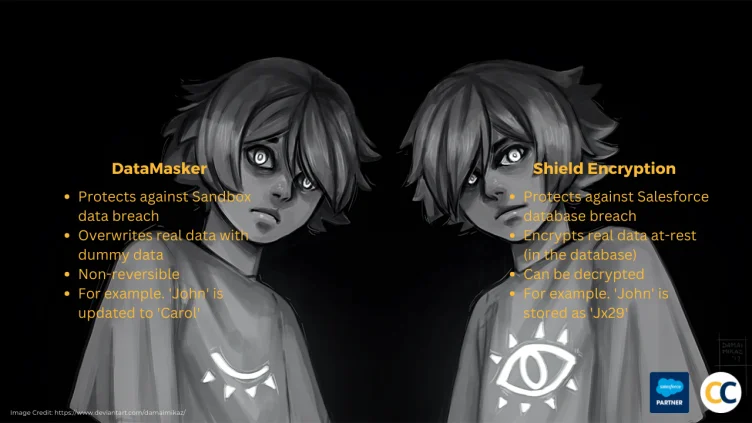
Wondering about Shield Encryption vs DataMasker? See the comparison

DataMasker is a native Salesforce data masking solution by Cloud Compliance that runs entirely within your Salesforce org, ensuring your data never leaves the platform. It can mask 100+ million records in less than 24 hours (3x faster than competing solutions), prevent email blasts and automation accidents, and address CPRA/GDPR/LGPD/HIPAA compliance requirements. 

 
Picture of Saurabh Gupta
Saurabh Gupta

Saurabh is an Enterprise Architect and seasoned entrepreneur spearheading a Salesforce security and AI startup with inventive contributions recognized by a patent.

Related Articles

Cloud Compliance
Privacy Overview

This website uses cookies to provide you with the best user experience possible. Cookie information is stored in your browser and performs functions such as recognizing you when you return to our website and helping our team understand which sections of the website you find most interesting and useful.